UKU Sauna Control System
Installation
The control panel should be installed outside the steam room. Only glass and wooden case control panels can be installed inside the sauna room. Plastic case control panel may not be installed inside the sauna room!
If you plan to install the control panel inside the sauna room, it can’t be installed higher than 100 cm from the floor and at least 180 cm from the heater (as far as possible). Additionally, the control panel must be installed at least 19.7 in / 50 cm away from any exhaust ventilation. If there is an exhaust port in the wall that has the door to the sauna, the control panel needs to be installed on the other side of the door.
If you plan to install the control panel outside the sauna room, then it must be protected from UV radiation and external weather effects. We recommend building a small wooden box or such to prevent direct contact with water/snow and protect from condensed water.
Plastic case
The control panel with plastic case should be installed outside the steam room.
Installation steps:
- Connect the cable following the numbering, ensuring that the numbering matches on the UKU main module side
- The mounting screw holes are hidden under the control panel button. Remove the button by gently pulling it.
- Fix the control panel to the wall with screws.
- Reinstall the button.
Glass case
Control panel with glass case can be installed inside the sauna room. In this case far away from the heater up to 1m from the floor.
The control panel with glass case is recessed into the wall. Before installation, make a recess in the wall with dimensions of 65 mm x 105 mm x 27 mm in the desired place.
Installation steps:
- Remove the protective film of the glass and the control panel button
- Remove the glass. The glass is fixed with magnets
- Connect the cable following the numbering, ensuring that the numbering matches on the UKU main module side
- Choose fasteners according to the material of the wall
- Attach the control panel to the wall
- Carefully place the glass back on the control panel housing
- Install the button
In sauna rooms, where the recessing of the control panel is not possible due to construction or surface finish, it can be attached to the wall using the control panel mounting frame.
Wooden case
Control panel with wooden case can be installed inside the sauna room. In this case at least 180 cm from the heater and up to 100 cm from the floor.
Installation steps:
- Remove the back cover of the UKU control panel to attach it to the wall.
- Mount the back cover on the wall, positioning the upper edge of the control panel at eye level.
- Connect the power cable to the screw terminal of the device.
- Secure the device to the back cover already placed on the wall.
- Use screws to secure it from the sides.
Yes, but the cable between the main module and the display unit may not be longer than 20 m.
You can find the manual here.
User instructions
To enter the settings menu hold the control panel button for 9 seconds.
The remote start safety function ensures that your sauna is safe to heat remotely when using a mobile app. It requires you to confirm that the sauna is empty and the door is closed before activating the heater. Once confirmed, the sauna remains safe for remote activation unless the door is opened.
Why is it important?
This feature prevents accidental heating when the sauna is not empty, reducing the risk of fire, overheating, or damage to items left inside. It prioritizes user safety and ensures proper sauna operation.
When to use it?
Always use the remote start safety function when you plan to heat the sauna remotely. Follow the confirmation steps to ensure the sauna is secure before activating it from your app. If the sauna door is opened, repeat the confirmation process to reactivate remote heating.
Can it be turned off?
In the settings menu it is possible to turn off the remote launch confirmation on the control panel. In this case, you can remote launch your sauna from the phone app, without confirming the safety of the sauna on the control panel.
The simple algorithm keeps all heating elements working at the same time until the desired target temperature is reached. After reaching the set temperature, the units are turned off until the temperature drops a few degrees below the set temperature – and after that, they will all heat up again, and the cycle will repeat.
The smart algorithm will engage all the heating elements until the desired temperature is reached and gradually turn off the heating elements one after the other. This allows you to save electricity, especially for heaters with a large number of stones (50+ kg).
- Hold the control panel button for 6 seconds
- Select desired time by turning the button
- Single short press – turns timer on
It is possible to switch the child lock option on or off. When the function is already activated, the child lock turns on automatically once the screen of the controller switches off.
- Hold down the display unit button for around 9 seconds.
- At first, you will reach the timer, please keep holding the button until you are in the menu.
- Turn the button until the child lock text is highlighted.
- Press the button once to switch it on. Exit the menu.
To turn on the device when the child lock is on, hold down the button and turn it first 90° clockwise and then 90° counterclockwise and then back to the starting position.
Find the “Heating time” function in the menu and set the heating time according to your sauna type:
- Private saunas 3h or 6h
- Semi-public saunas 12h
- Public saunas 18h
When using the local control panel, the heater follows the heating time specified in the settings, but the user can also stop the heating earlier.
When changing the heating time to more than 6 hours (max heating time for private saunas), the user should confirm that it is a semi-public sauna (max heating time 12h) or a public sauna (max heating time 18h).
At least 12h required for automatic start for the bookings.
Troubleshooting
If the display of the sauna control panel is not turning on, then it’s not receiving power from UKU control system.
Please contact us at support@en.old.huum.ee with a description of the problem.
Restart the router and try to reconnect.
To connect UKU to Wi-Fi:
- Go to the UKU control panel’s settings menu (hold the button down for 6 seconds – first you reach the timer menu, keep holding the button until you reach the settings menu).
- Go to “Wi-Fi settings”.
- Go to “SSID” and select it.
- Next, select the correct Wi-Fi network from the menu. Make sure your different Wi-Fi networks don’t have the same name. Otherwise, you may have problems connecting to the network.
- After selecting the Wi-Fi network, enter the password. Make sure your Wi-Fi network name and password are no longer than 20 characters.
- After entering the password, click “Connect” and follow the instructions in the wizard.
Please make sure you are connecting to the 2,4 GHz network, not the 5 GHz network; if both the 2,4 GHz and 5 GHz networks have the same name, rename one of them and then connect to the 2,4 GHz network.
Also, ensure that the Wi-Fi name and password do not exceed 20 digits. Make sure that the password doesn’t contain spaces.
If the controller of the UKU Wi-Fi sauna control system does not establish a network connection, save a screenshot of the error log that is displayed after pressing “Connect” and email it to us at support@en.old.huum.ee.
A slight difference between the measured temperatures is completely normal. It arises from the inherent limitations of measurement in the devices. However, if the difference exceeds 10–15 degrees, you should check the following:
- Are the temperature sensor and sauna thermometer placed in different locations in the steam room where the temperatures actually differ?
- Is the temperature sensor too close to the sauna heater? Or is it too close to the door?
The best location for the temperature sensor is 19.7 in / 50 cm from the heater and approximately 5.9 in / 15 cm from the ceiling. It should not be placed close to vents and should be min. 19.7 in / 50 cm from the windows and door.
If none of the causes described above apply, and the following problem persist, the fault likely resides in the temperature sensor or its wiring and it requires replacing. Please contact us at support@en.old.huum.ee with a description of the problem, your sauna ID and add a picture of your sauna room.
- Child lock
The child lock function ensures safety when using the sauna control panel and prevents unwanted access.
- Steamer
The steamer function enables one to configure the intensity of the steamer that is connected to the control system.
- Lighting
The lighting function enables one to switch the sauna room lighting fitting that is connected to the control system on or off.
- Heating time
You can use the settings of the control panel for configuring the maximum heating time – the control system switches the sauna heater off automatically when the preset time has passed. - Temperature unit
You can select the desired unit for the sauna temperature (celsius/fahrenheit). - Heating algorithm
You can select between simple and smart heating algorithms. Simple algorithm keeps all heating elements switched on until the desired target temperature is achieved. Smart algorithm starts gradually turning the heating elements off after the target temperature is reached. Smart algorithm helps to reduce the consumption of electricity, especially in heaters where the quantity of sauna stones is big (> 110,2 lb / 50 kg). - Vent/light
This function enables one to automatically switch the ventilation system or sauna lighting fitting that is connected to the control system on for 10, 15 or 20 minutes whenever the door is opened. - Timer
You can configure the start time for sauna heating with increments of 30 minutes. - Door sensor
The door sensor enables one to prevent overheating and switches the sauna heater off when the steam room door is open.
Temperature sensor with overheating protection
Overheating protection is employed when the temperature of the sauna room has risen to approximately 130 degrees in order to prevent thermal damage.
Installation
UKU sauna control system set contains all components that are necessary for mounting and using the control system:
- sauna control panel;
- main module (6⁷/₈ x 9²⁷/₃₂ x 2¹⁵/₁₆ in / 175 x 250 x 75 mm);
- temperature sensor;
- door sensor;
- temperature sensor and door sensor cables (197+197 in / 5+5 m; 2×24 AWG);
- control panel’s cable (118 in/3 m; 4×22 AWG).
- The electrical breaker must be sufficient (heater manual)
- Please don’t connect RCD or GFCI (ground fault) breakers
- The power cables must have sufficient cross-section for the chosen heater (heater manual)
- The heater wattage has to match the calculated sauna room volume, considering the uninsulated and heat-accumulating surfaces (calculator)
- The sauna ventilation must follow the specified principles. Read more about sauna ventilation.
- To prevent damage to the device, the operating environment temperature of the main module should remain between -20°C and 50°C and the maximum humidity in the room should not exceed 95%.
- The control panel should be installed outside the steam room. Only glass and wooden case control panels can be installed inside the sauna room.
- Determine the location of the parts of the control system in the room, then measure the lengths of the cables needed to connect them.
- When mounting the main module, please make sure that you are always able to open the access panel.
There are two options: inside or outside the steam room. Depending on the solution there are a few differences.
When UKU control system installed outside the sauna room.
The main difference is in the temperature sensor location. The sensor cannot be installed on the wall due to the size and construction of the room. In this case, the solution is to install the sensor on the ceiling.
In case the main module is installed outside of the sauna room and placed in a weatherproof housing to protect it from direct contact with water, snow, and condensed water. Insulated boxes such as metal switchboards are not suitable.
When UKU control system installed inside the sauna room
The temperature sensor location stays the same, but control panel cannot be installed higher than 1 meter from the floor and main module must be max. 4 in / 10 cm from the floor and as far away from the heater as possible (min. 6 ft / 180 cm).
When mounting the main module, please make sure that you are always able to access and open the panel. Do not attach the main module to the ceiling or inclined surfaces.
Crimping the power cable ends is mandatory. The compression of the metal sleeve ensures that the wire threads are held in place, minimizing the risk of loose connections that can cause electrical faults or pose safety hazards.
If the cable glands are not used, the IP class of the device does not apply!

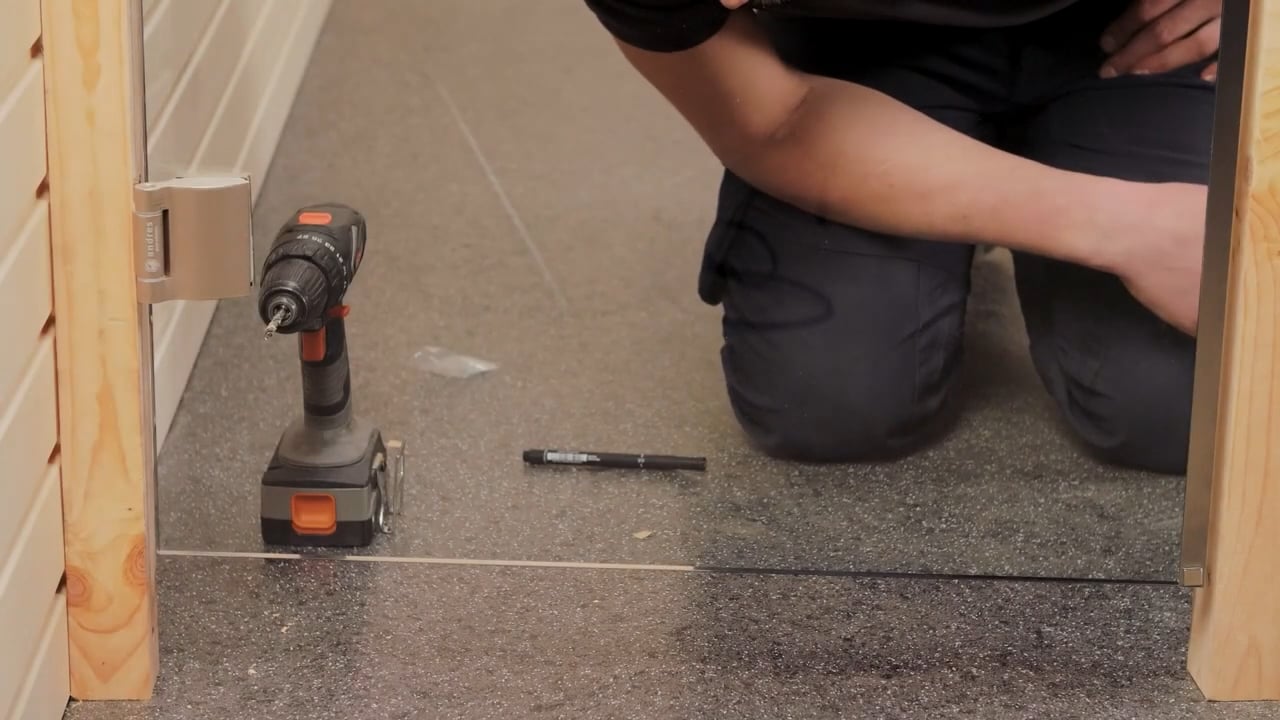
The door sensor must be installed on the handle side of the door frame, at a maximum height of 16 in / 40 cm from the floor. When installed higher, the temperature may affect the performance of the magnet and the durability of the magnet tape. The length of the cable between the sensor and the main module should not exceed 32 ft / 10 m.
The door sensor is one of the safety precautions that must be installed and cannot be bypassed.
When closing the door, the sensor and the magnet should remain slightly displaced, and the distance between them should not exceed 13/32 in (10 mm).
Distance from the window/door
The temperature sensor must be located at least 20 in / 50 cm away from the corners of the sauna room and air openings (door, window, ventilation).
Distance from the ceiling
If the temperature sensor is installed on the wall, the sensor must be not more than 6 in / 15 cm from the ceiling.
Distance from the heater
The temperature sensor should not be located directly above the heater, but 20 in / 50 cm from the outer edge of the heater.
If the sensor cannot be installed on the wall at the specified distances due to room size or construction, it must be placed on the ceiling. Position it 20 in / 50 cm from the heater’s edge at the ceiling’s highest point.
Accurate positioning of the temperature sensor in a sauna is essential for maintaining accurate temperature regulation, ensuring user safety, and achieving optimal heating efficiency. A correctly placed sensor helps maintain a consistent and comfortable temperature throughout the sauna, preventing overheating or underheating. It also ensures that the heater operates efficiently by responding accurately to the actual room temperature, rather than to localized hot or cold spots. Most importantly, proper sensor placement helps avoid dangerous temperature extremes, contributing to a safe and enjoyable sauna experience.
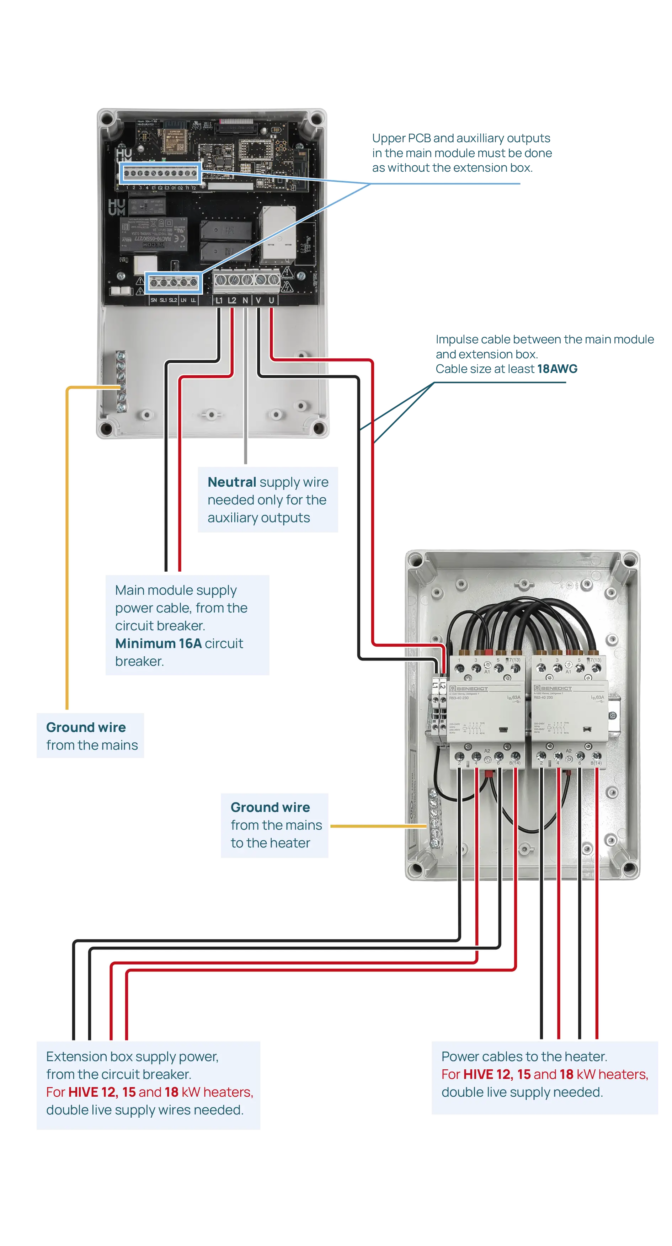
An extension box is required for heaters with a power output exceeding 18kW because the current needed by the heater exceeds the standard load limits. The extension box helps distribute the load and allows for the management of higher currents, ensuring safe and efficient operation. Without an extension box, the electrical system could overheat or become overloaded, posing a risk to both the heater and the overall reliability of the electrical network. Extension box is not allowed to use with a single-phase connection.
With a three-phase connection you will need an extension box with over 18kW heaters.
If you have a UKU Local control system but wish to upgrade to Wi-Fi connectivity, this can be done through the HUUM mobile app. The upgrade does not require calling a technician. First, you have to connect the UKU control system to the Wi-Fi network as described before and then install HUUM Mobile app and create an account. All further instructions are given in the mobile application.
You can find the manual here.
Troubleshooting
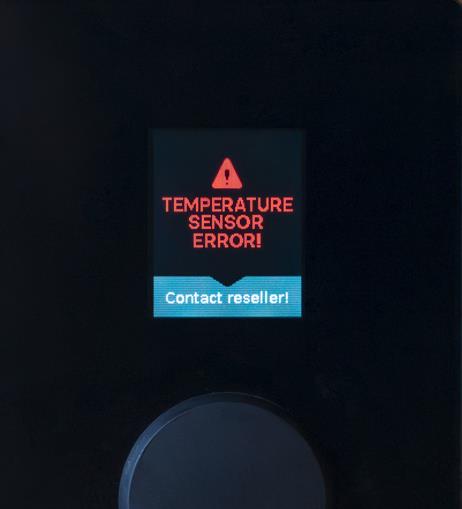
If the error message “Temperature sensor error!” is displayed on the screen of the control panel, it means that the main module is not receiving correct information from the temperature sensor.
Possible reasons:
- cables aren’t properly connected
- cable is faulty
- temperature sensor itself is faulty
Please contact us at support@en.old.huum.ee with a description of the problem.
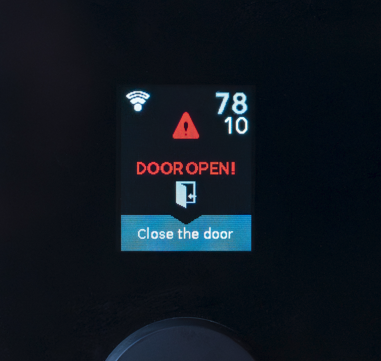
If the error message “Door open” is displayed on the screen of the control panel, it means that the main module is not receiving correct information from the door sensor.
Possible reasons:
- sensor and magnet aren’t correctly aligned
- main module is not working correctly
- door sensor is faulty
- cable connection is faulty
Please contact us at support@en.old.huum.ee with a description of the problem and Sauna ID.